
How to get my belief air heater Bluetooth Function correctly connected?
Some clients feedbacks that I try to do everything correctly step by step for my 2.2kw air parking heater, but why, I can’t still use my Bluetooth Function? After this questions were mentioned Twice, I think it necessary to clarify some details need to pay attention during your operation.
Most client prefers to the LCD switch when they buy the air parking heater, SO, I take the LCD switch for example,
 If your phone is Iphone, Search the app in the APP store, My bluee,
then find it in the setting and turn on the bluetooth first,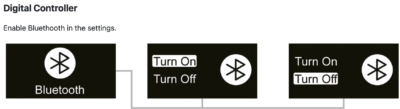
All of the details, I had made a clear file and save in the Download Page, pls follow the link and download the details.
IF your phone is Andriod, Pls contact the after-sales to get the APP download link first, I will not take too much time write the details here,
When you successfully finish the above operation, A list of bluetooth devices in the vicinity will show.
The Default Bluetooth Name for the Rotary Controller is 204@BLF
The Default Bluetooth Name for the Digital Controller is 210@BLF
Click the device with that name, then it will come to the PAGE to insert the Initial password 123456, THEN, Here it comes the most important part of this POST, even most of the client did everything right, but still failed, they can’t connect the bluetooth,
Do NOT, press the button on the LCD switch Enable the Bluetooth Pairing ahead of the PHONE pass.
DO press the PASS on the Iphone first after insert the Initial password 123456, than, press the button (Enable the Bluetooth Pairing) on the LCD, Most people made the mistake here,

